Global Forest Watch
Usability Testing | UX Research
Class Project - INLS 719: Usability Testing and Evaluation @ UNC Chapel Hill
A semester-long project during my graduate studies evaluating a data visualization website by applying qualitative and quantitaive usability testing and evaluation research methods.

Project Overview
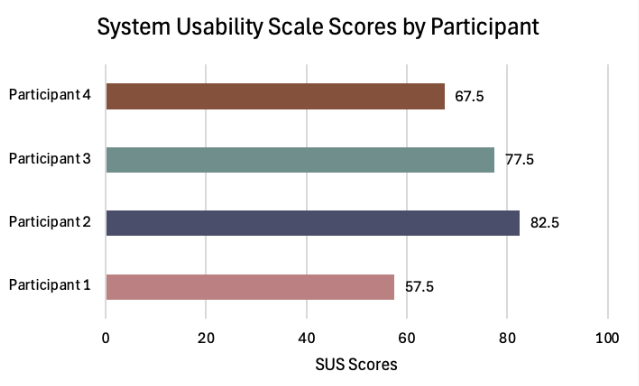
Over the course of a semester-long usability project, my team and I conducted a usability evaluation of the website Global Forest Watch (GFW), an open-access, online monitoring platform that provides near-real-time data and tools for tracking forests worldwide. We began by conducting heuristic evaluations of the website following Nielsen’s 10 heuristics in order to guide the formation of our tasks for the usability test. We developed four tasks that aimed to example the visibility of the data and navigability of the features on the website. We collected both qualitative and quantitative data types, including time on task, task success rate, verbal/facial expressions, and self-report Likert post-task questions. Participants also filled out a pre-test questionnaire in order to understand any previous use of GIS systems. Additionally, participants completed a post-session interview and completed a System Usability Scale (SUS) test. We had a total of 4 participants. While we did calculate an average SUS score of 71.25 from our participants, one participant gave a rating of 57.5, indicating that not all users found the interface intutitive and usable. After analyzing our findings, we came up with three major design recommendations to the layers, analysis, and shape tools in order to create a more user-friendly interface.
Role:
User Experience Researcher
Team:
Cindy Xu
Estella Calcaterra
Navya Babu
Timeframe:
Sept. 2025 - Dec. 2025
Global Forest Watch
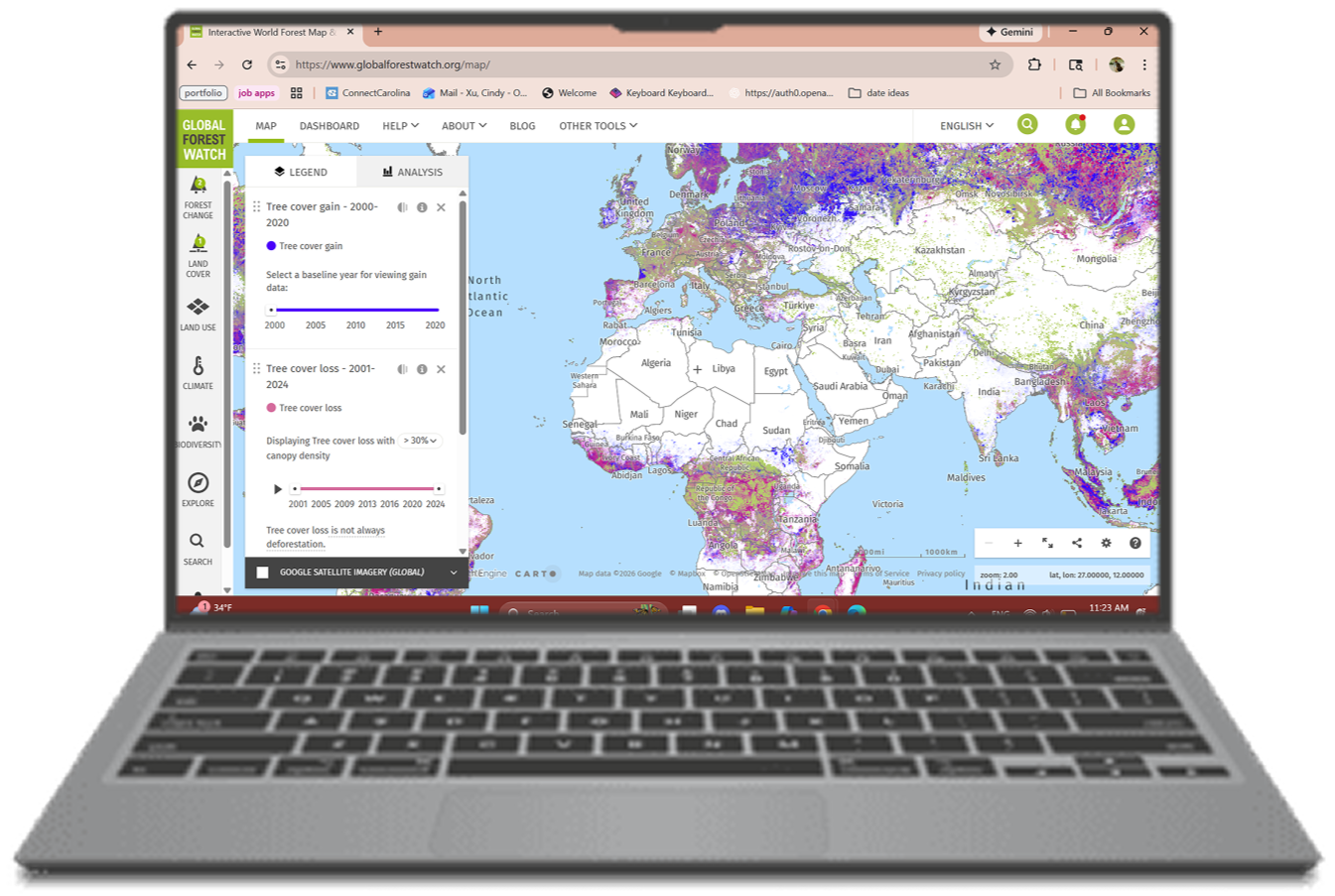
Global Forest Watch (GFW) is an open-access, online monitoring platform that provides near-real-time data and tools for tracking forests worldwide, available at https://www.globalforestwatch.org and through the Forest Watcher mobile app. It is managed by the World Resources Institute (WRI) in collaboration with partners such as Google, research institutions, NGOs, and technology companies. Its main goal is to enable governments, companies, researchers, journalists, and citizens to monitor forest cover change, biodiversity, land use, and threats such as logging, fires, and agricultural expansion. GFW integrates satellite imagery, government records, and crowdsourced data in order to provide their near-real-time data on forest change, allowing users to explore interactive maps and generate custom analyses for their data needs.
We selected GFW due to its extensive features and functions. It is a highly data-intensive platform with large datasets on a global, country, and regional scale on a wide variety of data relating to forestry. Despite its complexity, GFW’s interface still remains relatively clean and appears well designed to support broad usability. It allows users to explore and analyze real-world data without requiring specialized expertise, login credentials, or actions that could have unintended consequences.
Evaluation Goals
To guide our initial research plan, we needed to define our evaluation goals, identify key questions, and establish our evaluation measures and metrics. Looking at these goals helped us to develop an understanding of how intuitive the system is in terms of the design of its major features, identifying features for which the system was not as effective in its messaging of instructions based on how well users were able to complete tasks associated with that feature.
1
Visibility
Are users able to effectively navigate and adjust the visibility of the Map feature in order to view the information being sought?
2
Navigability
Are users able to effectively navigate to features of the Map to use it to its full potential?
Research Design and Environement
We applied research design principles we learned in class and administered a within-subjects usability study, which included the following metrics:
Performance
Time on task
Task completion/success rate
Verbal/Facial expressions of frustration, doubt, and/or confusion
Self-Report
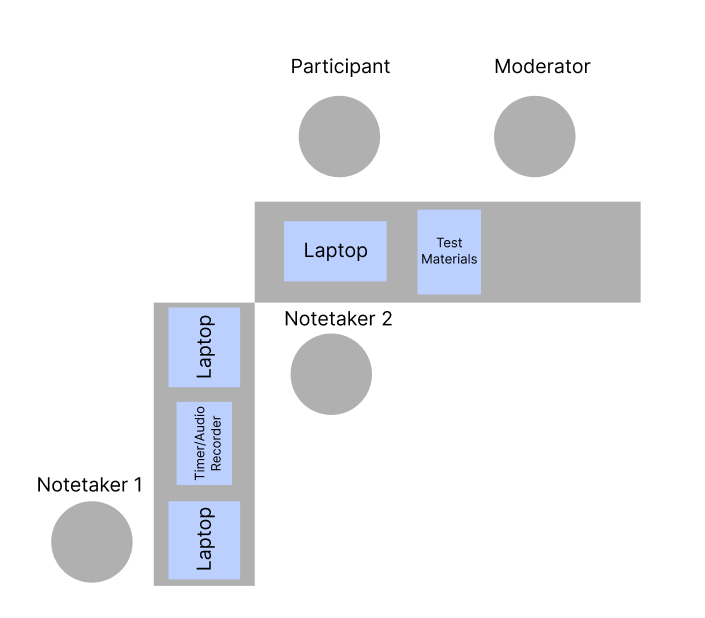
Aerial view of testing set-up
Think aloud
Post-task Likert scale
System Usability Scale
A more in-depth test plan can be found linked below.
Post-Session Interview
Observe comments regarding the system
Suggestions for improving the system
Our test design included an introduction, pre-test questionnaire to gather demographics and previous system use information, a task completion portion, concluded by a post-test interview and questionnaire for more quantitative and qualitative data.
The test was conducted in Manning Hall Room 014 at UNC Chapel Hill. Our moderator was sat to the left of our participant while notetakers sat to the right and in front of the participant to observe
Usability Tasks
For our usability test session, we created four usability tasks, which directly correlated to our evaluation goals and findings from our heuristic evaluation. We wanted to test and see if our evaluation findings correlated with user findings.
Task List
Identify which year Sri Lanka had the highest primary forest loss.
Compare “Tree cover loss” and “Forest greenhouse gas emissions” in Brazil. Make any adjustments (i.e., lower the opacity) to the layers you think will help make it easier for you to interpret the overlap. What do you observe about the two layers?
Draw a shape on the map around the Maldives, including Male and Addu City, and find what biome the area is part of.
Find the number of “Highest confidence detection by multiple alert systems” for “Integrated Deforestation alerts” in Brazil from 2023 to 2025.
Findings
Once we were finished conducting our four usability tests, we then analyzed the data we gathered, with a focus on both qualitative and quantitative data, wanting to triangulate by cross-referencing performance data, self-reported difficulty, and observational insights to form a comprehensive understanding of usability challenges and user experience trends. We identified common themes with issues across our participants including unclear system visibility and lack of customization that iterferred with participant’s ability to complete tasks.
Task Difficulty
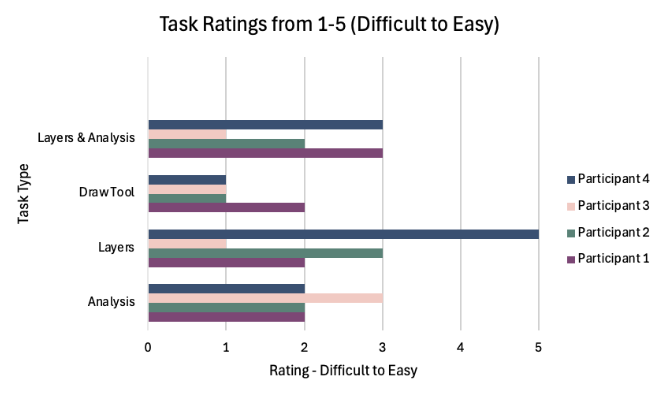
Participants found tasks to be moderate to high in difficulty. Most participant task ratings were ≤ 3, indicating they weren’t easy. Analysis and Draw Tool tasks had the most ratings between 1 and 2, indicating that these tasks were perceived as the most challenging. P4 stood out: while they also rated most tasks as somewhat difficult, they found the Layers task significantly easier, giving it a 5. Overall, the trends suggest that core interactions in Global Forest Watch pose usability challenges for many users
Time on Task
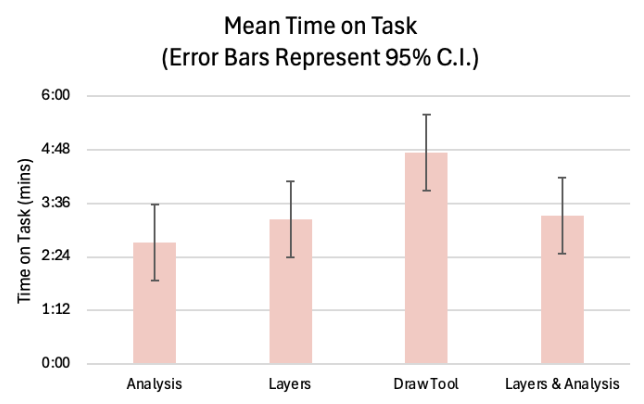
The Draw Tool task took the longest overall, averaging right under 5 minutes, suggesting high complexity and greater variability in user approaches to the task. Analysis was the quickest task, averaging around 2.5 minutes. The Layers and Layers & Analysis tasks fell in the middle, each averaging around 3 minutes. These patterns suggest that tasks involving creation (like drawing) introduced more cognitive load, while data exploration tasks were quicker and more straightforward for most users.
Task Complete/Success Rate
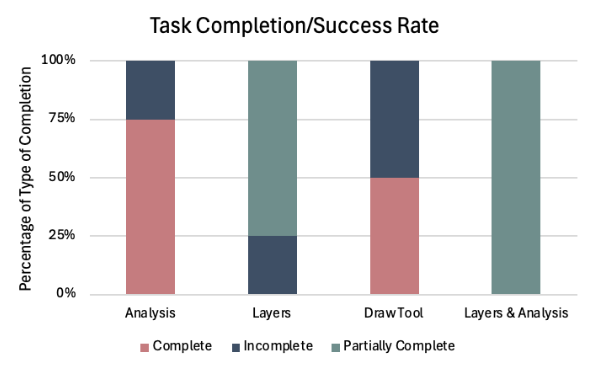
Analysis task had a strong completion rate, with 75% of attempts fully successful. The Layers and Layers & Analysis tasks showed the highest levels of partial completion, suggesting that participants understood the general workflow but struggled with specific details required to fully complete the tasks. The Draw Tool task produced a more mixed outcome: 50% of attempts were complete and 50% incomplete. Results suggest that tasks with layer management and multi-step analysis require clearer guidance and creation-based tasks (like drawing) also presented barriers to full success.
Participants struggled to find key tools.
3 out of 4 participants had difficulty locating the “Analyze” tool that is the main function of the system that allows users to view in-depth forest data and information.
The Draw Tool task took the longest among participants to complete, averaging right under 5 minutes for completion, with the largest hinderance being able to locate the tool in the first place according to think aloud notes, leading to only 2 out of 4 participants completing the tasks.
2. Participants were unable to customize their view, inhibiting user function.
The Layer Comparison task elicited the most points of confusion and frustration due to lack of system visibility and customization to improve visibility.
The Timeline task was difficult for users to navigate due to the need to naviagte between the Legend and Analysis tab in order to see system updates, leading to 4 out of 4 participants partially completing the task.
System Usability Scale
Our post-session questionnaire was a System Usability Scale questionnaire. We calculated the mean responses and calculated an average SUS score of 71.25. To put this into comparison, any score of 68 is considered "average.” However, it is notable that one participant gave a rating of 57.5, falling below below the typical cutoff for acceptable usability. These results indicate that though individual differences highlight opportunities to improve user experience, most users perceived the system as usable.
Avg SUS v. Avg GFW SUS
Design Recommendations
After our analysis, we provided several UX recommendations in an attempt to improve the usability of GFW’s website. We supported these suggestions with quotes taken from participants’ think aloud sessions along with visual representations on our recommendations in our slide deck. In the end, we came up with three major design recommendations for GFW:
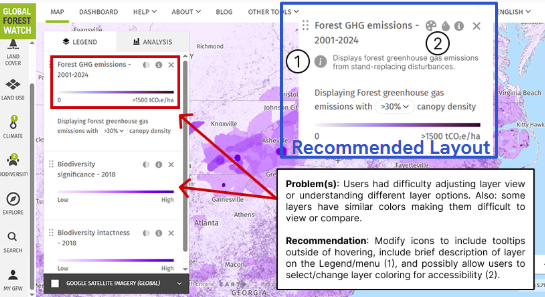
Layers
Problem: Layers have unclear descriptions, options, and coloring.
Recommendation: Clarify layers with text descriptions. Allow for further user customization: color, opacity, etc. This improves usability and accessibility (improving color contrast).
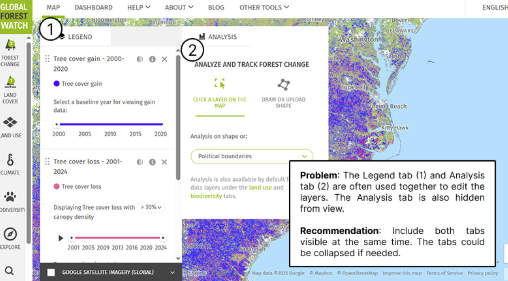
Analysis Tab
Problem: Separation of the Legend and Analysis tabs results in the Analysis features being less used and heavy cognitive load when switching between the two.
Recommendation: Allow users to view both tabs at once to update layer settings and view visualizations concurrently. Tabs could be collapsable.
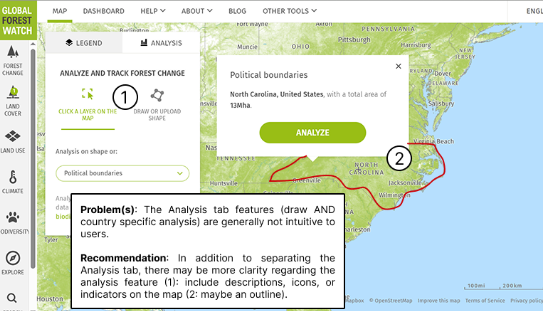
Shape Analysis
Problem: The Analysis tab features are hidden with unclear descriptions.
Recommendation: Clarify what the features do and how to use them. This includes: Descriptions, Icons, or UI indications (i.e., on the map).
Project Takeaway
This project was one of the most comprehensive, and ultimately most rewarding, experiences of my graduate program. Working through the full lifecycle of the study pushed me and my team to engage deeply with the details of usability test design, from how the moderator greeted participants to where they were positioned in the room. Attending to these seemingly small decisions strengthened my research practice, which I believe have strengthened my skills as a researcher.
One of the most significant challenges we encountered was learning when to intervene and when to step back during sessions. We were constantly navigating the tension between supporting participants and allowing them to struggle productively. This experience sharpened my ability to recognize when participant errors were generating meaningful insights versus when they were creating unnecessary cognitive burden. Learning to make these judgment calls in real time was a pivotal growth moment for me as a researcher, and has since informed how I design, moderate, and reflect on user studies.